Google Search Console in 2026: The Strategic Guide for Business Owners
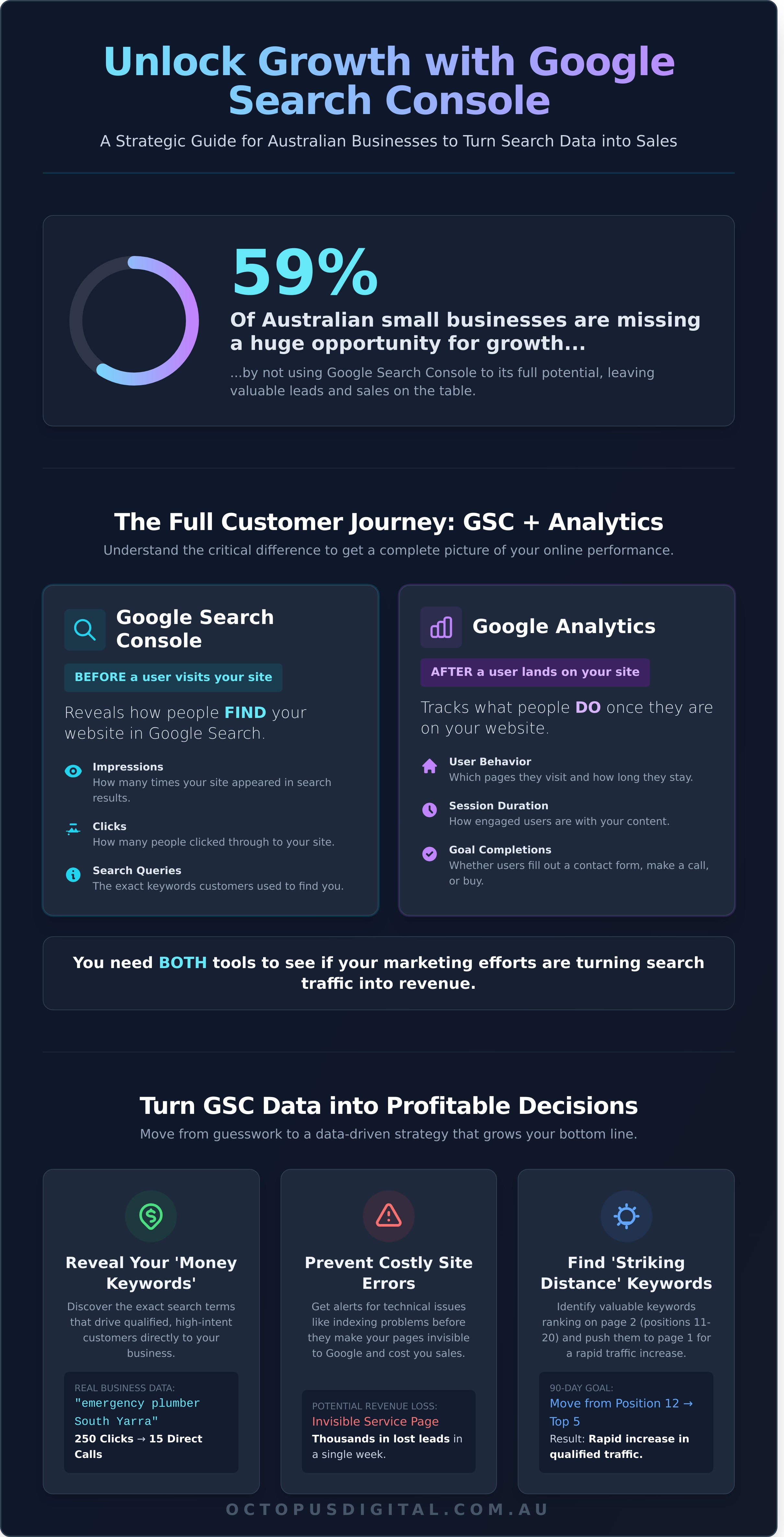
Did you know that a 2024 BrightLocal survey found 59% of small businesses in Australia don't use Google Search Console to its full potential? That's a staggering number of businesses missing a direct line of communication from Google, and a huge untapped opportunity for growth.
It’s easy to see why. You log in and you're met with a wall of charts, technical terms, and performance data, but no clear instructions on what to do next. It's a common frustration for business owners; you see the information, but turning it into tangible results feels impossible. You're left wondering if your website is even showing up correctly for the customers you want to attract.
This strategic guide is designed to change that. We'll show you how to cut through the noise and transform your google search console data into a powerful, predictable engine for generating high-quality leads and sales. Don't worry, we've got you covered. By the end, you'll have a clear, actionable plan to improve your rankings and understand exactly how Google views your strongest customer touchpoint.
Key Takeaways
- Learn the critical difference between Google Analytics and Search Console to get a complete picture of your online performance.
- Discover how to use performance data to identify your most valuable pages and find new opportunities for customer growth.
- Master the initial setup of google search console to ensure you are collecting accurate, business-critical data from day one.
- Turn raw search data into a powerful lead generation strategy by optimising your content to answer the exact questions your customers are asking.
What is Google Search Console and Why Does Your Business Need It?
Think of your website as your digital storefront. Now, imagine having a direct phone line to the world's largest search engine, where it tells you exactly how many people are looking at your storefront, what they searched for to find it, and if your front door is accidentally locked. That's precisely what Google Search Console is: a free, powerful service that acts as the primary communication channel between your business website and Google.
It provides invaluable data on your site's performance in Google Search, helping you understand and improve how the search engine sees your pages. Unlike other tools that guess at performance, Google Search Console delivers data directly from the source. It’s the ground truth for your organic search traffic, offering insights that are critical for turning your website into a high-quality lead generator. Sound confusing? Don't worry, we've got you covered.
The Business Case for Monitoring Your Search Presence
Effective digital marketing is about data, not guesswork. GSC provides the hard data you need to make profitable decisions. It alerts you to critical technical errors before they impact your bottom line. For example, a simple indexing error could make your most profitable service page invisible on Google, potentially costing your business thousands in lost sales leads in a single week. GSC spots these issues and tells you how to fix them.
More importantly, it reveals the exact 'money keywords' that are driving qualified traffic to your site. For a Melbourne-based plumbing business, discovering that the search term "emergency plumber South Yarra" resulted in 250 clicks and 15 direct calls last month is actionable intelligence. Similarly, a specialised B2B company like Independent Scale Service could use this data to find they are attracting high-value clients searching for specific industrial equipment. This data allows you to double down on what works, refining your content and SEO strategy to attract more of the right customers. Every Australian business owner deserves access to this information; it’s the key to protecting and growing your online revenue.
GSC vs. Google Analytics: A Simple Comparison
Many business owners confuse these two essential tools, but their roles are distinct and complementary. Understanding the difference is crucial for building a results-driven digital strategy.
- Google Search Console tells you what happens before a user gets to your site. It focuses on your visibility in Google's search results, tracking impressions, clicks, and the search queries people use to find you.
- Google Analytics tells you what happens after a user lands on your site. It tracks user behaviour: which pages they visit, how long they stay, and whether they complete a goal like filling out a contact form.
In short, GSC tells you how people GET to your website, while Analytics tells you what they DO once they are there. You absolutely need both to see the full customer journey. Without GSC, you don't know which search terms are actually working. Without Analytics, you don't know if that traffic is converting into leads and sales. Think of Google Search Console as the ultimate health check for your search engine optimisation.
Navigating the Dashboard: Key Reports That Drive Business Growth
Once you’re set up, the Google Search Console dashboard becomes your command centre for organic growth. It’s not just a collection of charts; it’s a direct line to how Google views your website and how your customers find you. Focusing on the right reports is critical for turning data into a steady stream of high-quality leads and sales for your business.
The four most critical areas to monitor are Performance, Indexing, Experience, and Security. Neglecting any one of these can undermine your marketing efforts, leaving potential revenue on the table. Let’s break down what you need to watch and why it matters.
Performance Metrics That Actually Matter
The Performance report is your window into what's working. It shows the exact search queries customers use to find you, how many times you appear (impressions), and how many people click through to your site. A high ranking means nothing if no one clicks. Your Click-Through Rate (CTR) tells you how compelling your search result is. For example, a service page ranking at position 5 with a 10% CTR will drive more qualified traffic than a competitor at position 3 with a poor 3% CTR. It’s about winning the click, not just the rank.
Tracking your Average Position shows your climb up the search results. The real goldmine here is identifying your 'striking distance' keywords. These are valuable terms where you already rank on the second page (positions 11-20). With a focused effort on on-page optimisation and internal linking, these can become first-page winners in under 90 days, delivering a rapid increase in traffic. For a detailed walkthrough, Ahrefs offers a fantastic guide on How to Use GSC for SEO, outlining specific tactics to find these quick-win opportunities.
The Experience Tab: Improving Your Strongest Customer Touchpoint
Your website is your strongest customer touchpoint, and the Experience tab shows how well it’s performing for real users. This isn't a 'nice-to-have'; since Google's 2021 Page Experience update, it's a core component of converting traffic into sales.
With over 60% of Australian web traffic now on mobile, a flawless mobile experience is critical. The Mobile Usability report flags issues like text that's too small to read or buttons that are too close together, which cause frustration and lead to lost customers. The Core Web Vitals report measures user experience with concrete data:
- Largest Contentful Paint (LCP): This measures loading speed. If your main page content takes longer than 2.5 seconds to appear, you're losing visitors before they even see your offer.
- Cumulative Layout Shift (CLS): This measures visual stability. A low CLS score means your page doesn't jump around as it loads, preventing users from accidentally clicking the wrong thing.
These performance metrics directly impact your web design ROI. A 1-second delay in load time can result in a 7% reduction in conversions. Optimising these vitals ensures the traffic you work so hard to get actually converts. If these technical reports seem overwhelming, putting an expert team behind your business can turn these data points into tangible growth.
Beyond the Basics: Turning Data Into a Lead Generation Strategy
Once your website is verified, the real work begins. Many business owners see Google Search Console as a simple health report, but its true value lies in transforming raw data into a powerful lead generation engine. This isn't just about tracking clicks; it's about understanding exactly what your potential customers want and how they search for it. This raw data, which you can learn more about in the official Google Search Console overview, represents real user behaviour and provides a direct roadmap for growing your business.
Your goal is to move beyond passive monitoring and start using these insights to make strategic decisions that drive sales. Here are four effective techniques to get started:
- Identifying 'Content Gaps': The 'Queries' report shows you every search term that brought users to your site. Look for questions or service-related terms that have high impressions but no dedicated page on your site. If a local builder sees dozens of searches for "cost to build a deck in Mornington" but only has a generic "services" page, that's a profitable content gap waiting to be filled.
- Optimising Meta Tags for Clicks: Are your pages showing up in search but getting ignored? A high impression count with a click-through rate (CTR) below 3% often points to a weak page title or meta description. Use the query data to rewrite your headlines with the exact language your customers use, including benefits or a call to action to win the click.
- Strategic Internal Linking: The 'Pages' report reveals your site's most authoritative pages-the ones Google already trusts. Use the power of these pages. By adding a keyword-rich internal link from a high-performing blog post to a newer, high-value service page, you pass on authority and help it rank faster.
- The 'Low-Hanging Fruit' Technique: In the 'Queries' report, filter by 'Position' and set it to show rankings greater than 10. This reveals keywords where you're ranking on page two. These pages are on the cusp of generating significant traffic. A targeted optimisation effort, like improving the content or building a few internal links, can often push them onto page one for a major boost in visibility and leads.
Query Analysis for Local Businesses
For businesses serving a specific area, the 'Queries' report is a goldmine. Filter your search queries to include local suburbs like "Mt Eliza" or "Aspendale" to see exactly how customers are looking for you. Differentiating between an 'Information' query like "how to fix a dripping tap" and a 'Buying' query like "emergency plumber Aspendale" is critical. The high-intent buying queries from your google search console data are perfect candidates for an effective Google Ads campaign, allowing you to capture customers ready to make a purchase now. For a comprehensive guide on building these high-return campaigns, you can find out more.
The Power of the 'Pages' Report
Navigate to the 'Pages' report to identify which service pages are your true 'workhorses' for lead generation-the ones driving the most clicks and impressions. Pay close attention to pages with high impressions but a low CTR. This often indicates that while your page is relevant, its title, copy, or on-page experience isn't compelling enough to earn a click or convert a visitor. This granular, page-level performance data directly informs our custom website design process, ensuring your most valuable digital assets are engineered for conversion.
Setting Up Google Search Console: A Step-by-Step Implementation Guide
Unlocking the powerful data inside Google Search Console begins with a correct setup. This isn't just a technical box-ticking exercise; it's the foundational step that ensures every report you see is accurate, comprehensive, and actionable. A flawed setup can lead to fragmented data and missed opportunities for growth. Get it right, and you'll have a direct line to how Google sees your website.
First, you must choose your property type. Google offers two options:
- Domain Property: This is the recommended, all-encompassing option. It captures data from all versions of your site (including www, non-www, http, and https) in one single dashboard. For over 95% of Australian businesses, this is the correct choice.
- URL Prefix Property: This is an older method that only tracks the exact URL you enter. For example, it would treat `https://yourdomain.com.au` and `https://www.yourdomain.com.au` as two separate sites, splitting your data.
Always choose the Domain property. It provides a complete picture of your performance and simplifies your analysis from day one.
Verification Made Easy
Proving you own your domain might sound technical, but it's a straightforward process. The most robust and permanent method is DNS verification, which we use for all our clients. Sound confusing? Don't worry, we've got you covered. Here’s how it works:
- Select 'Domain' as your property type in GSC and enter your domain name (e.g., yourbusiness.com.au).
- Google will provide a unique TXT record (a line of text). Copy this code.
- Log into your domain provider (like GoDaddy or Crazy Domains) and find your DNS settings.
- Add a new 'TXT' record, paste the code from Google into the 'Value' field, and save.
- Wait about an hour for the change to take effect, then click 'Verify' back in GSC.
A common pitfall is giving up too soon. DNS changes can sometimes take up to 24 hours to propagate across the internet. Be patient before assuming it has failed.
The Importance of Sitemaps
An XML sitemap is a roadmap of your website, created specifically for search engine crawlers. It lists all your important pages, helping Google discover and index new content faster. Most modern websites, especially those on WordPress using plugins like Yoast SEO, automatically generate one at `yourdomain.com.au/sitemap.xml`. Submitting it is simple:
- In your google search console dashboard, navigate to 'Sitemaps' under the 'Indexing' menu.
- Enter your sitemap URL (e.g., `sitemap.xml`) in the field provided.
- Click 'Submit'.
This isn't a one-time task. Regularly check this report for errors. Issues like 'Couldn't fetch' or '404' indicate that Google is hitting dead ends on your site, which can directly harm your SEO performance.
Configuring Users and Permissions
To get the most out of your data, you need to put an agency behind your business. Granting secure access is critical. Instead of sharing your personal Google password, you can add your agency as a user with specific permissions. Simply go to 'Settings' > 'Users and permissions', click 'Add user', and enter their email. For a full-service SEO partner, grant 'Full' permission. This allows them to submit sitemaps and configure settings to drive effective results for your business. Getting this setup right is the first step to turning raw data into measurable growth. If you want an expert team to manage this process and translate insights into more traffic and leads, book your free discovery call with us today.
Putting an Agency Behind Your Data: The Octopus Digital Approach
Understanding the data in Google's tools is one thing. Turning that data into more leads and sales is something else entirely. While free tools provide the raw materials, it takes an experienced team to transform those numbers into a strategy that grows your business. At Octopus Digital, we move beyond simple monitoring. We provide active, results-driven management that makes your data work for you.
We don't just watch the charts; we make them go up. Our process begins by integrating insights from google search console directly into our custom web design and SEO strategies. Before we even think about a new design, we analyse your site’s historical performance to identify which pages and search queries already drive valuable traffic. This data-first approach ensures your new website is built on a foundation of what already works, protecting your rankings and creating a powerful engine for lead generation.
This focus on tangible outcomes extends to our reporting. You don't need another confusing report filled with technical jargon. You need to know what's impacting your bottom line. Our monthly reports are built around the metrics that matter: qualified leads, phone calls, and sales. We connect our SEO activity directly to your business growth, showing you exactly how our work is delivering a measurable return on investment.
Looking ahead to 2026, the digital landscape is only becoming more competitive. Google's algorithm updates are more frequent and complex. A reactive, DIY approach is no longer enough to scale. Professional management is the key to turning these challenges into opportunities and securing sustainable growth.
Strategic Partnership vs. DIY
The sheer volume of data available can lead to 'analysis paralysis'. An experienced partner cuts through the noise. We dive deep into your business objectives to translate raw data into a clear roadmap for growth. During a critical phase like a website redesign, this partnership is invaluable. We use GSC to meticulously manage the transition, protecting your rankings and ensuring a seamless launch that boosts your authority from day one.
For those looking for inspiration on what a data-driven approach looks like in practice, it can be helpful to review the work of established agencies. For example, even though they are based in the US, the strategies used by DNA Digital Marketing show how powerful translating GSC data into sales can be for any business.
Ready to Grow Your Business?
Data is just data until it generates a lead. Our professional SEO services transform insights from tools like google search console into tangible business growth. We handle the technical complexities so you can focus on what you do best: running your business. Stop just monitoring your metrics. It's time to start moving them.
Put an agency behind your business today. Ready to see what a results-driven strategy can do for you? Book your free discovery call with our Mornington Peninsula team and let's build your growth plan.
Your Next Step: Turn GSC Data into Business Growth
As we look towards 2026, your online success hinges on understanding exactly how customers find you. You've seen that mastering the data within google search console is the first step, revealing everything from high-traffic keywords to critical indexing issues. But raw data doesn't pay the bills; a clear strategy that turns those insights into sales does.
This is where we come in. Our expert Mornington Peninsula-based team has a proven track record of delivering tangible results for local Australian businesses by integrating powerful SEO and web design. We translate complex data into a reliable stream of high-quality leads. Don't worry, we've got you covered.
It’s time to put a professional agency behind your data. Book Your Free Discovery Call today and let's build a clear plan for your business growth.
Frequently Asked Questions About Google Search Console
Is Google Search Console free to use for my business?
Yes, Google Search Console is completely free. It's a no-cost tool from Google designed to help you monitor your website's performance in search results. There are no hidden fees or premium versions; the full suite of features is available to any verified site owner. This makes it an essential, high-value tool for any Australian business looking to grow its online presence without increasing its marketing budget.
How long does it take for data to show up in Search Console?
Data typically starts appearing in Search Console within 24 to 48 hours after you verify your site. However, some reports, like the Performance report, can have a processing lag of a couple of days. Google states that most data is available within three days of processing. This means you can start analysing clicks, impressions, and your site's health almost immediately, allowing you to make data-driven decisions for your business quickly.
Can Google Search Console help me get rid of 'spammy' backlinks?
Yes, you can address spammy backlinks using the Disavow Tool within Google Search Console. This feature lets you submit a list of domains or URLs that you want Google to ignore when assessing your site. It's a powerful but advanced tool. We recommend using it with caution, as disavowing the wrong links can harm your rankings. It should only be used if you have a significant number of toxic links that you believe are causing issues.
Why is my website showing up in GSC but not on the first page of Google?
Your website appearing in Google Search Console simply confirms it's indexed, not that it's optimised to rank on the first page. Ranking on page one requires a targeted SEO strategy focusing on factors like high-quality content, relevant keywords, site speed, and a strong backlink profile. GSC provides the data to identify opportunities for improvement, but achieving top rankings is a competitive process, and if you need help from a dedicated agency to outperform competitors, you can check out mintz.
How often should I check my Google Search Console reports?
We recommend checking your key Google Search Console reports at least once a week. A weekly check-in allows you to monitor performance trends, identify new keyword opportunities, and quickly spot critical errors like manual actions or coverage issues. For major site updates or during an active SEO campaign, checking daily for the first 3-5 days is a good practice to ensure a smooth rollout and track immediate impacts on your traffic.
Does Google Search Console work with Shopify or WordPress websites?
Absolutely, Google Search Console integrates seamlessly with both Shopify and WordPress websites. Both platforms make it straightforward to verify your ownership, often through a simple HTML tag or a dedicated SEO plugin like Yoast for WordPress. Once connected, you gain full access to all GSC reports. This allows you to monitor your e-commerce or business site's performance and is an essential step for any serious site owner on these platforms.
What should I do if I see a 'Manual Action' in my dashboard?
If you see a Manual Action, you must address the specific issue Google has identified immediately. A manual action means a human reviewer found your site violates their guidelines, which can significantly harm your rankings. Read the notice carefully to understand the problem, fix the violation, and then submit a reconsideration request through GSC. This can be a complex process, so don't worry, we've got you covered if you need expert help.
Can I use Google Search Console for local SEO in Melbourne?
Yes, Google Search Console is a valuable tool for improving your local SEO performance in Melbourne. While it doesn't have a specific "local" report, you can analyse the Performance report to see how you rank for location-based keywords like "plumber in Richmond" or "cafe near me". This data helps you understand what local customers are searching for, allowing you to optimise your content and Google Business Profile to attract more qualified local leads. For businesses looking for expert help in this area, local SEO specialists like KD Interactive can turn these insights into a powerful growth strategy.